


When you design a newsletter, one question quickly arises: What dimensions should an email have?
The short answer: 600 pixels. This isn't a hard-and-fast rule, but it's a target width that has stood the test of time and is still considered the most reliable dimension for emails. But there's nothing stopping you from doing something else!
In this article, I'll also be taking this opportunity to tackle the other factors that can influence the performance of your newsletters: responsive design, email file size, and user experience (CX). This way you'll be completely ready for your next mailing!
The ideal email dimensions
Email width
A width of 600 px is still today the current standard when designing a marketing email.
Historically, electronic messaging systems offered a readable area of around 500 to 600 pixels.1 Screens have evolved a lot since then, but this convention has remained, even with the arrival of mobile.
Many messaging platforms, such as Klaviyo, Brevo, and Mailchimp, use 600 px by default. However this template is still adjustable. Nothing is stopping you from trying a larger width to offer a new experience with a much more original result! But this is on condition that you test your emails with different messaging providers to validate the final presentation.
And what about email length?
There's no magic number. After many years of advising clients on their email campaigns, there is no ideal length I would automatically recommend.
Let's take a moment to bust a myth: Yes, people scroll! Today scrolling is a natural behaviour, especially when content is relevant and well structured. Jakob Nielsen's work has shown that users scroll through pages, but their attention remains strongest in the initial sections and progressively reduces as they continue.2
The issue therefore isn't keeping your email “above the fold,” but providing a good reason to continue reading.
- Clear visual hierarchy
- Well-delineated sections
- Clear titles
- Visible calls to action
That said, consider placing your most important content at the start of your email.
A simple promotion can therefore be contained within a few paragraphs, while an editorial newsletter can naturally be longer. This means there is no ideal length, just a length that is relevant to your content and your audience.
Be careful, however, not to exceed 102 KB (I'll let you scroll a bit further to find out why!).
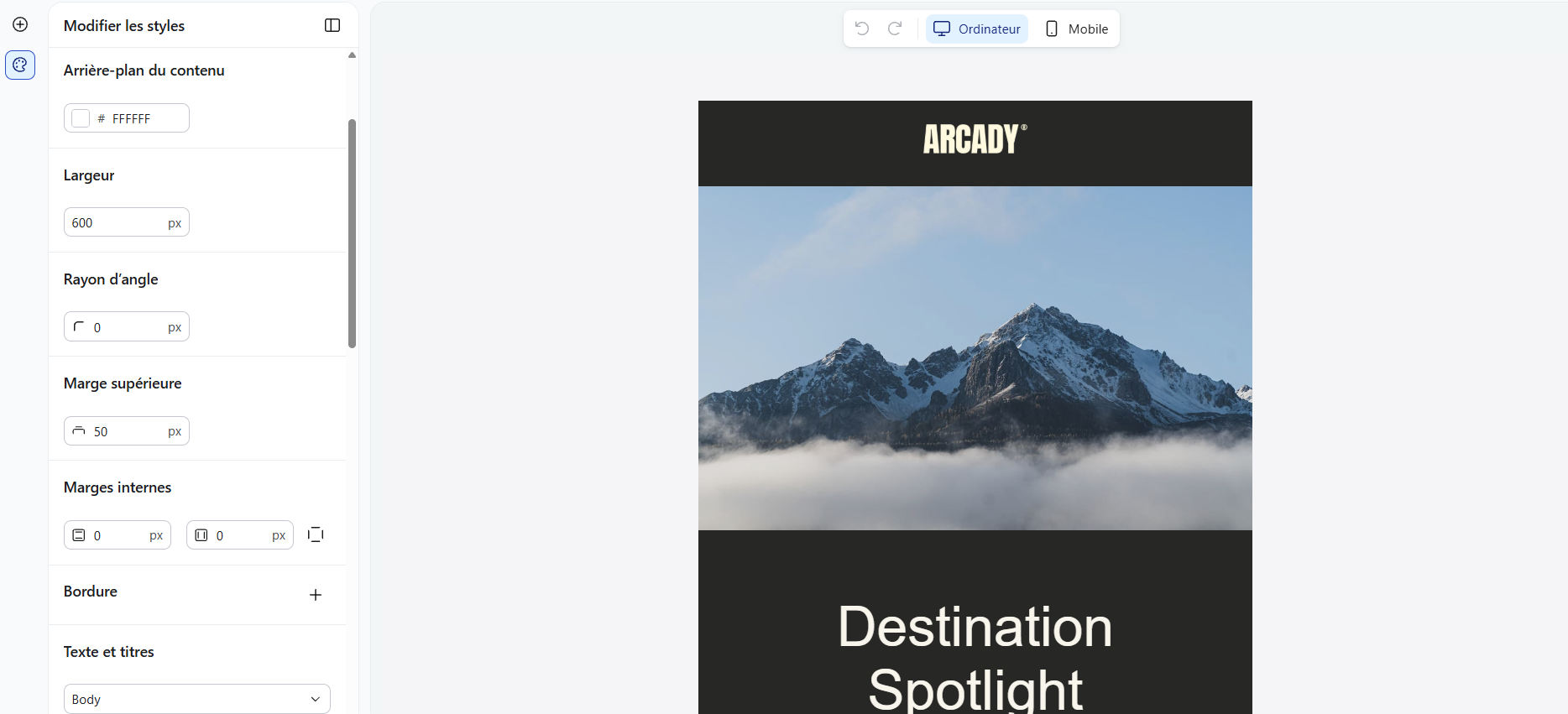
Preview of an email design in Klaviyo, configured by default to a width of 600 pixels.
An email design adapted for mobile
On mobile, it's no longer just a matter of pixels. Your email needs to adapt to each user's screen.
Known as responsive design, this adaptation is indispensable these days: 71% of people look at their email on a mobile device.3
Your 600-pixel template on desktop must therefore be able to adapt to a much smaller screen. The good news is that most email platforms offer editors and templates that facilitate the creation of responsive emails, particularly by adapting the layout and size of elements.
If you're coding your own emails in HTML, pay special attention to responsive code. This allows notably for columns, images, and other elements to adapt to the size of the screen, all while taking into account the particularities of different email clients.
Pay attention to email file size
No matter the size of your newsletter, whether long or short, at 600 pixels or more, you need to also consider the file size, especially for HTML code and your images.
Keep your emails under the 102 KB mark, including text and HTML code. This limit notably applies to Gmail, which truncates emails that exceed this threshold. A part of your content becomes hidden, which could be detrimental to:
- reading experience;
- campaign performance; and
- the visiblity of certain elements, such as the link to unsubscribe or the tracking pixel.
And that's not all: Images that are too heavy can slow the email's loading time. So consider optimizing both the weight of your HTML code and that of your images to offer a seamless reading experience and contribute to good deliverability.
Is an overly long loading time and an extra click to read a newsletter (in other words, too many!) really the experience you want to offer your audience?

Preview of email file size in Hubspot | Source
Test before sending
Even with a width of 600 px and a responsive template, never assume the result will be identical everywhere.
The various messaging services don't all interpret HTML and CSS in the same way. Before sending, verify at minimum the appearance on desktop and mobile and how your emails display on the email providers used by your audience.
Beyond email size: Customer experience (CX)
It's no surprise that email marketing best practices go further than just the dimensions of the email and even the most beautiful of designs.
Your newsletter can tick all the technical boxes, but if it doesn't take your audience's needs into consideration, it's missing the most important thing.
In your email marketing strategy, your should particularly consider:
- Accessibility and readability, both in the interface as well as in terms of the content
- Content relevance and value provided to the recipient
- Personalization, based on the needs and behaviours of your subscribers
- Adapting the message to the stage of the customer journey the recipient is at
- Trust, by being clear about customer data use and consent management
Email marketing remains an excellent way to get to know your customers better, generate prospects, and support your marketing mix. So don't reduce it to merely sending an email. Every email must bring real value to the recipient.
So what size should you choose for your email?
A width of 600 px remains a good starting point, but not an absolute rule. The length must match your content instead of being a precise number of pixels, and on mobile your template must adapt to the space available.
The right size is the one that makes your message clear and readable, irrespective of the screen. But this is only part of the equation: Your brand's customer experience and the performance of your marketing depend on a lot more than the size of your emails.
Once the technical foundations of your template are in place, move on to the next step: Orchestrating your email campaigns
At adviso, we don't stop at just the newsletter template. We align data, customer journey, and business objectives to send the right message, at the right time, to the right person. Learn more about our approach to email marketing.
REFERENCES
¹ Klaviyo, “Optimal email template width reference,” Klaviyo Help Center, August 4, 2025.
² Zoltán Gócza, “Myth #3: People don’t scroll,” UX Myths, 2012.
³ Thomas Hajdukowicz, “Key takeaways from Sinch Mailjet’s The Path to Email Engagement 2024,” Mailjet, February 29, 2024.
The article What Is the Ideal Width for an Email? first appeared on adviso.ca. It was originally published in November 2009 and was updated in September 2026. Our content is always designed and validated by our experts, who use AI to optimize it.


How to make a marketing plan: goals, strategies, tactics, and KPIs
Before launching marketing campaigns, implementing artificial intelligence (AI), or beginning any pr …

Profit or profitability? Measure the real value of a campaign
“This campaign is bringing a slightly lower return on investment, but it’s a lot more profitable!”

Partnerships between loyalty programs: Advantages and examples
Loyalty programs have started to apply a well-known principle: If you want to go far, go together.