

Are you using Salesforce (SF) Data Cloud or are you planning on integrating it into your marketing technology (MarTech) stack? You’re doubtless already familiar with how the platform can enhance your strategies through its 360-degree customer view and AI-based chatbots.
If so, then I also take it as a given that you’re using Google Analytics 4 (GA4) as a platform for collecting digital behavioural data (mobile, web, and offline events). Note that, for the purpose of this article, “GA4 data” refers to the granular data exported in Google BigQuery.
Keep reading to learn about Salesforce Data Cloud, its potential, and key steps for a successful integration.
What is Salesforce Data Cloud?
SF Data Cloud is a platform that allows you to harmonize data from several sources, such as a CRM, transactions, and a product catalogue, in order to generate customer intelligence and audiences (segments).
SF Data Cloud isn’t a data warehouse or data lake like Google BigQuery, Snowflake, or Databricks; instead, it enables interoperability with these platforms to activate their data.
To maximize the use of SF Data Cloud, it’s wise to also use other Salesforce platforms: Marketing Cloud, Sales Cloud, Service Cloud. This is because SF Data Cloud offers better interoperability (to facilitate the exchange of data) with its activation platforms.
My reason for mentioning this is that SF Data Cloud is a major pillar of Salesforce’s artificial intelligence (AI) strategy, which employs chatbots (Salesforce Agentforce) to increase the profitability of companies. These AI agents can access your company data as well as the 360 view of your customers. In simple terms, SF Data Cloud is the foundation for Salesforce’s AI chatbots.
Before creating your 360 customer view, ensure you have already developed a data strategy.
Why use GA4 data in Salesforce Data Cloud?
GA4 data can be used to enhance your 360 view of your customers. This 360 perspective can help you create segments that will be activated in your engagement platforms (ad platforms, email platforms and personalization platforms).
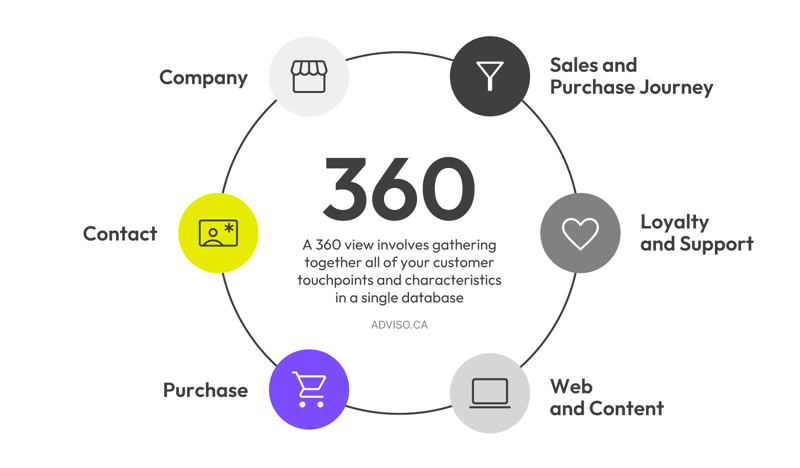 I recommend implementing the GA feature User-ID to facilitate harmonization with other data sets (data from CRM, sales, products, etc.) within the SF Data Cloud environment.
If your use case is real-time personalization in Marketing Cloud Personalization (on Salesforce), you should understand that Google Analytics 4 (GA4) data are not a replacement for behavioural data collection in SF Data Cloud. Real-time personalization requires implementing the SF Data Cloud library for web and mobile data collection.
What are Salesforce Data Model Objects (DMO)?
Data model objects (DMO) are a very important aspect of using Salesforce Data Cloud. They are pre-made data entities that allow the platform to harmonize and reconcile data sets. It’s highly recommended that you have the basics in modelling (entity relationship diagram) before implementing them.
It would take too much time to explain how these different models work in this article. Nevertheless, here are a few models you’ll need to understand if you plan to integrate Google Analytics 4 (GA4) data:
Standard DMOs
- Individual DMO
- Contact Point App DMO
- Contact Point Digital DMO
- Website Engagement DMO
- Party Identification DMO
Contextual DMOs
In the following, I’m taking a retail business as an example.
The DMOs would be different for a prospect generation site, the integration of a loyalty program, or customer service management (tickets).
The combination of DMOs is highly dependent on your use case. They can also be customized. Your GA4 data must be structured based on the DMO that applies to your use case. The DMOs Contact Point Email, Contact Point Phone, and Contact Address are not necessary for GA4, given Google Analytics’ privacy policies. Depending on the mapping you have in mind, you need to prepare your data for ingestion into SF Data Cloud.
Additional reading: Why should you add your Google Analytics (GA4) data to a warehouse or data lake? And how?
How to integrate GA4 data into Salesforce Data Cloud?
Once you’ve decided on the type and structure (given your DMOs) for the GA4 data you want to ingest into SF Data Cloud, there are several options available based on your technology architecture.
Option 1: GA4 + Google BigQuery + SF Data Cloud
This approach creates intermediary tables in Google BigQuery and connects them to SF Data Cloud.

Option 2: GA4 + Google BigQuery + Google Cloud Storage + SF Data Cloud
This option exports Google BigQuery data to Google Cloud Storage. The data in Cloud Storage are ingested into SF Data Cloud.

If your data are already residing in a Snowflake or Databricks environment, you can create connections directly from these platforms to SF Data Cloud.
GA4 and Salesforce Data Cloud: A powerful combination
If you already have Salesforce Data Cloud or are about to get it, integrating your Google Analytics 4 data would be a powerful strategic lever. The creation of a 360 view and the potential of having artificial intelligence–driven chatbots are major arguments in favour of justifying the investment.
I hope this article has shed some light on the use case for GA4 data in SF Data Cloud. If you have any questions or would like to discuss the subject further, don’t hesitate to get in touch.

Why should you add your Google Analytics (GA4) data to a warehouse or data lake? And how?
Why should you add your Google Analytics (GA4) data to a warehouse or data lake? And how? Why If you use Google Analytics 4 to collect data from your websites or mobile applications, it’s wise to store a copy of these data in your own systems for avariety of reasons.
Why You Should Export Your Google Analytics 4 Data to BigQuery
The new version of Google Analytics, commonly referred to as GA4, offers the opportunity to export raw data from the platform towards Google Cloud’s BigQuery. It’s a big decision by Google, given that previously, only customers of the paid version of Google Analytics 360 had access to this functionality. Here’s why marketers should consider this option carefully in 2021. How to save $150,000 in Google Analytics 360 licensing fees Other than the fact that it helps prepare you for the seismic changes coming in the world of digital marketing, the major advantage of implementing GA4 is that it provides you with the opportunity to export your raw data – FREE – from Google Analytics to Google Cloud’s BigQuery data warehouse. The goldmine represented by having access to raw analytics data is one of the main reasons many large companies decided to procure GA 360 licenses in the first place. As mentioned in our earlier article on GA4, this represents a massive savings and opens up access to the …

How to Make Google Analytics Great Again by importing ExactTarget Data?
With the rise of social media, it’s easy to dismiss Email as a has-been digital marketing medium because most of us spend so much time is spent on social apps. The reality is that Email still outperforms social media in terms of reach and ROI. If you have access to more than one Google Analytics, you have probably noticed that the email channel tends to convert better than other channels and at a cheaper cost. So if you use an enterprise marketing solution such as ExactTarget (renamed SalesForce Marketing Cloud in 2014) or Responsys (acquired by Oracle in 2013), it would be a good idea to integrate your Email campaigns data to your marketing analytics solution.