
Why should you add your Google Analytics (GA4) data to a warehouse or data lake? And how?
Why
If you use Google Analytics 4 to collect data from your websites or mobile applications, it’s wise to store a copy of these data in your own systems for a variety of reasons.
- To take control of your data. What would happen if you wanted to leave Google Analytics or if the product disappeared?
- To analyze all of your marketing data in a holistic way, such as when reconciling your efforts with the performance you see in GA.
- To push use cases beyond what the interface suggests.
To this end, there are a number of ways to save your GA4 data for storage in a warehouse or data lake: integrate either the raw data or the API aggregated data. Let’s take a look at which fulfills your needs as well as the methods available to reintegrate them.
Raw event data
Raw data contain events ingested as-is by GA4. They have so little enrichment that Google could operate in GA4. The model’s level of granularity is “one line per event.” These are the data we want to ingest if we’re looking to reconcile a user’s actions with their purchase journey and their connection with a brand within a 360 context (link in French only).
Advantages:
- The native connector is easy to configure and use.
- It’s integrated directly into GA4, which means that data are automatically transferred to BigQuery in a few clicks.
- It’s free of charge for GA4 customers.
- It’s the only way to establish complex use cases that require several consecutive actions by the same user within a single period (for example).
Drawbacks:
- The data are stored in BigQuery, which may be expensive if you have a lot of data.
- You can’t customize the data that’s imported. You have to calculate the metrics yourself.
- No data modelling. Data from non-consenting users carry no session or user identifier.
Using the GA4–Big Query native connector
The simplest and most common way to save Google Analytics 4 data in a data warehouse is to use the native GA4-BigQuery connector. This connector automatically imports GA4 data to BigQuery, where you can then examine and analyze them using SQL.
The connector can be configured in 2 ways:
- Real-time streaming: the moment an event is ingested into GA4, it is exported to BQ
- Batching: Once a day, a list of events from the day before is exported
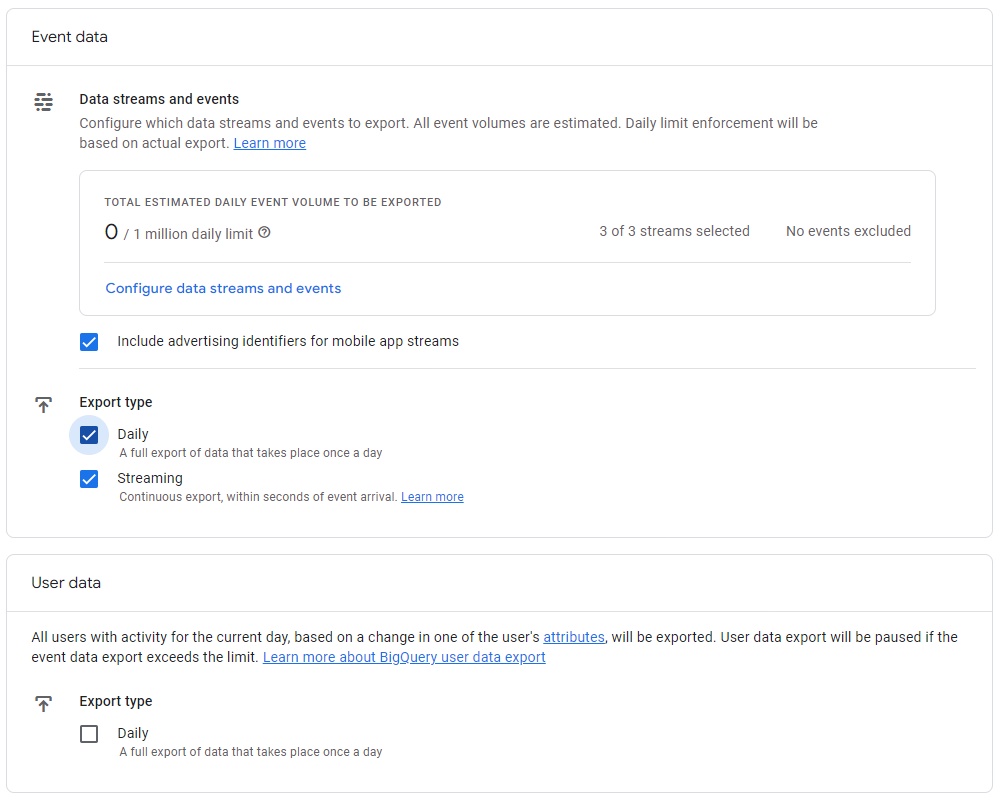
The connector is configured directly in your GA4 property.
Saving the data in another data warehouse
It is often the case that your company already has a data warehouse in which you would like to centralize your GA4 data. The first thing you should know is that you can’t forgo using BigQuery—you’ll need it as a data transfer platform. The process for saving this data in another warehouse will therefore be different depending on the situation.
In Snowflake
Snowflake has a native connector to suck in BigQuery data into its own storage space, then slightly transform them to adapt them to the Snowflake model. For more information, you should read my previous article on creating a 360 view in Snowflake.
In another warehouse (Databricks, Redshift, etc.)
An excellent solution for transferring data into a data lake like Databricks or Redshift is to export the previous day’s table of data into Google Cloud Storage on a daily basis. It’s then fairly simple to copy the data into your respective storage space (GCS to S3 or GCS to Blob Storage). All the major cloud providers integrate services for copying external data to their respective cloud service.
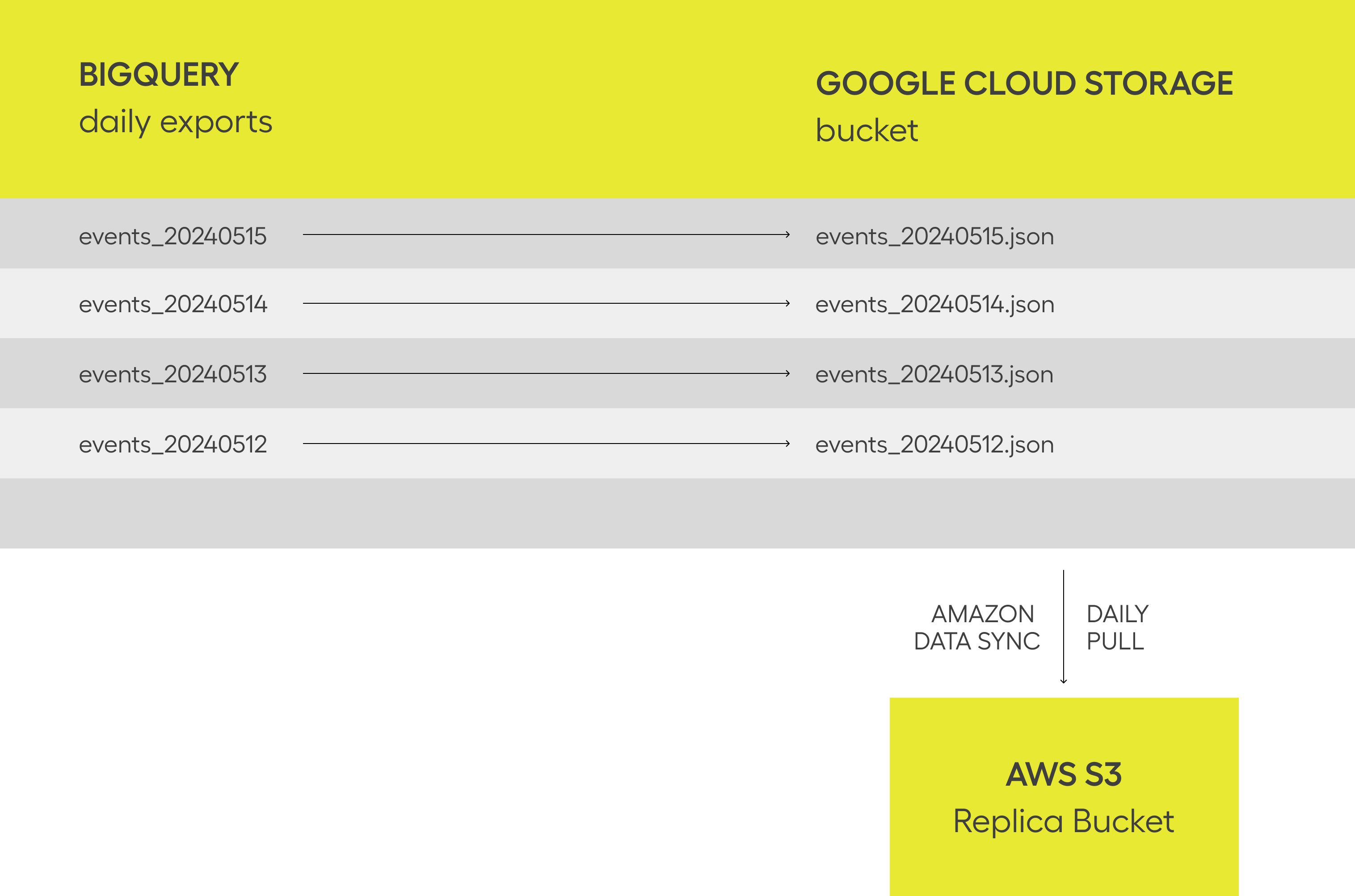
Example of no-code replication of data from GCS to S3 via AWS DataSync.
How do you derive metrics and statistics?
Once the use cases are defined, you can use a tool such as dbt or Dataform to transform data via SQL pipelines to make analysts’ lives easier.
For example, dbt is the most popular tool out there to perform this work, and there are already existing packages to transform GA4 data in BigQuery. You should note that dbt is also available for Snowflake, Databricks and Postgre, but there is no “premade” code in existence as of the time of writing.
GA4 aggregated data
It is also possible to save “Report”-style aggregated data via the GA4 API. The granularity will be adjustable depending on the use case. This could be seen as a faster, more efficient way to save your simple report data. On the other hand, the use cases will be very limited. You will never know which user did what with this method.
You could, for example, retrieve on a daily basis the number of sessions and users who visited your site by acquisition channel, source, and medium. You could refer to the list of metrics and dimensions to identify possible use cases.
Advantages:
- You can customize the model of the data that are retrieved.
- The data modelled by Google algorithms are included. If the interface displays 100, the API returns 100. This facilitates QA and the confidence specialized teams have in the data.
- Fairly fast time to value for simple use cases.
Drawbacks:
- Expect certain limitations to use cases. The API has limits on the number of dimensions (amongst other things).
- If your property is highly subject to sampling, the total lines returned by the API may vary from the total displayed in the interface (by up to 5%).
- The API has quota limits that may restrict complex use cases.
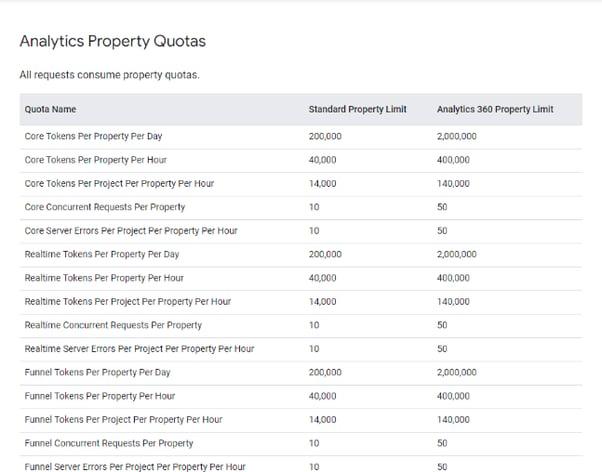
To retrieve data from the GA4 API, you have 2 major options:
Use “customized” scripts
This requires development skills to extract the GA4 data via the API and save them to your data warehouse. This can be accomplished by using online developer libraries like those available for Python and R, maintained by Google, which are fairly simple to use for veteran programmers. However, like any such technical project, be aware that this will require maintenance over the years as the GA4 API is updated.
We don’t recommend that our clients develop their own scripts except in a few very specific cases.
External third-party connectors
There are also external third-party connectors, such as Supermetrics, Airbyte, or Fivetran, which can be used to save GA4 data to a data warehouse. These connectors are generally paid connectors and may require additional configuration.
The advantage is that the time to value is extremely fast if you don’t consider the time it takes to enter into a contract. If you find your company can be a bit slow to integrate new third-party solutions, this could take several weeks or months.
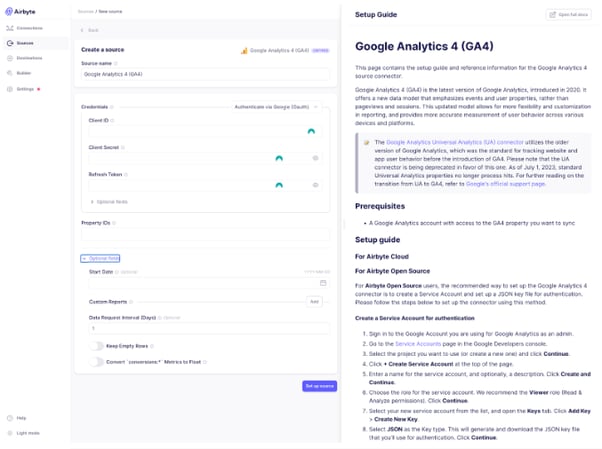
We always recommend using an integrator of this type whenever possible for our clients. Basically, it’s a lot safer for the long-term viability of your project.
Conclusion
Which paradigm should you choose? Your selection will depend on your specific needs and your development skills. First you need to ask yourself about your use cases. In reality, you’ll probably use a bit of both methods. As of the time of writing, “acquisition”-type reports are often easier to integrate via the API because Google’s attribution rules and the modelling are sometimes hard to reconstruct in SQL. On the other hand, it’s a lot more enjoyable to work with raw data for all customer knowledge cases.
We help our clients define their marketing data integration and centralization needs on a daily basis. Don’t hesitate to get in touch with us if you have any questions.
-1.png?width=40&height=40&name=Guillaume%20Wagner_36%20(1)-1.png)