

Google Analytics immediately offers tight integration with Adwords, which raises the possibilities of analyzing this source of traffic to a whole new level. It is therefore possible to cross-reference Adwords keywords with the wealth of data available in Google Analytics. However, what about the keyword searched by the visitor before clicking on the ad? What was the original research intent ? And ultimately, why do some Adwords keywords convert so badly on my site?
** Updated April 25, 2008 to reflect changes to new tracking code
A small review of what is being done in this area highlights two main approaches to obtain this famous keyword:
- Custom Filters Method by Jim Newsome
- Custom variable custom variable method with ga.js by Michael Harrison
The good news is that it works, the bad news is that no solution is perfect. In more detail, let's see each of the approaches.
CUSTOM FILTERS METHOD
This first approach is certainly the simplest and only requires creating two filters in Google Analytics and applying these filters to a separate profile.
When it comes to filters, we always recommend applying them to a new profile, to keep a profile with raw data.
- Create two filters, Override Bid Term 1 & Override Bid Term 2 .
- Apply these filters to a new profile, in the order presented.
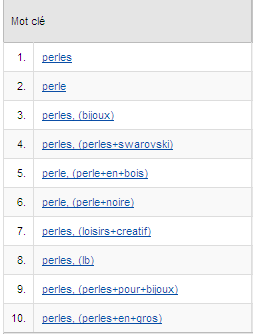
Keywords from Adwords will now be displayed in the format “Adwords keyword, (words+keywords+searched)”:
ADVANTAGES
- Quick to set up
- Does not require a change to the site
DISADVANTAGES
- For some unknown reason (we are investigating this), this method does not show conversion data in Google Analytics, all numbers are zero.
Although very disappointing from a conversion data point of view, this method is set up in the blink of an eye and allows you to discover the impertinent searches that led to a click on an ad.
CUSTOM VARIABLE METHODS
Here it is rather a question of using a javascript script to extract the keywords from the referer and using the __utmSetVar function to store these words in a variable which will now be attached to the visitor.
Question of grouping the two approaches:
FOR THE NEW VERSION OF THE TRACKING CODE – GA.JS:
- Download the following new script: ga_keyword2.js
- Change the tracking code on all pages of the site, to reference this new script:
FOR THE OLD TRACKING CODE – URCHIN.JS:
- Download the following script: ga_keyword.js
- No need to call the sleuth() function, a simple script reference will do the job:
- Here is the script to use: ga_keyword.js .
- Change the tracking code as follows:
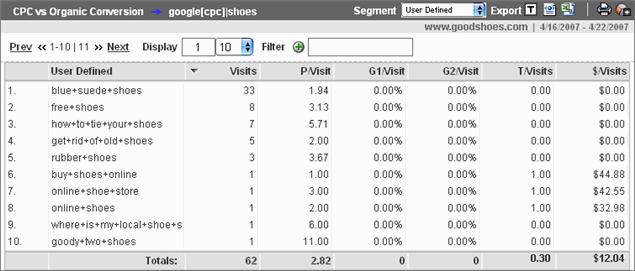
To take advantage of the result, go through “Traffic sources > AdWords > AdWords campaigns” and choose “Custom values” in the segment drop-down menu:
ADVANTAGES
- Lets get the conversion data!
- Allows cross-referencing with several other Google Analytics reports
DISADVANTAGES
- Requires modification to site code
- Monopolizes the use of the personalized variable, relevant to segment visitors in many cases (members vs non-members, visitors vs buyers, …)
If you don't currently use personalization variables on your site or don't plan to, don't hesitate!
AND THE WINNER IS…
As you will have understood, there are no ultimate winners but two interesting solutions requiring compromises in all cases. However, both approaches address the initial need to understand why certain AdWords keywords aren't converting.
-3-1.jpg)
10 ways to pay less for your Adwords
If you are investing in the keyword purchasing, this article may be a key factor in improving their profitability and performance. Our experience in managing Adwords campaigns has allowed us to determine several factors which could drastically reduce your cost per click (CPC).

#LifeHack: Avoiding data sampling in campaigns
How to structure your analytics campaigns the best possible way in order to avoid data sampling in your results? Learn from our analytics expert in this article!

The Google Analytics API: free your data
The reports offered in the Google Analytics interface satisfy the vast majority of its users. And for good reason, they answer most of the questions you may have about the performance of content, campaigns and user behavior. Google Analytics also allows the creation of dashboards to have an even more refined and personalized view of its data.