
Did you know that Facebook offers a tool to analyze the viral properties of your website on Facebook? Indeed, Facebook allows you to install the same statistics tool on websites as on pages: Facebook Insights .

THIS TOOL ALLOWS YOU TO SEE, AMONG OTHER THINGS:
- The number of impressions of your web pages on Facebook
- The number of times visitors like the article out of total visitors
- The number of impressions of your articles on Facebook following shares The number of organic shares of the article on Facebook (without going through the Facebook "share" button)
- Demographics of users who have shared your articles
- Facebook Comments usage statistics (number of comments / impressions)
Media-type sites, sites with a lot of daily content, and blogs will have the greatest benefit from using this tool to analyze the social media reactions of their content over time. Data from Facebook Insights compiled with data from Google Analytics will allow for even more comprehensive insights into the most popular content on Facebook . Read our article “ Measuring Social Media with Google Analytics and Webmaster Tools ” to learn more.
AMONG THE OBSERVATIONS YOU CAN DRAW:
- The days of the week with the most shares and clicks
- The demographics of users who share your content
- The number of impressions generated by shares
- The most commented articles
- The number of times your articles are shared organically (without the use of Facebook plugins)
- Average impressions for each share
- etc…
In order to make your analysis even more precise , Facebook makes it possible to obtain data on the most popular URLs (in terms of likes and clicks) of your site. These statistics are only presented in "last 24h" or "last hour" format and it is not possible to export them, unfortunately.
Here are sample charts featured in Facebook Insights:
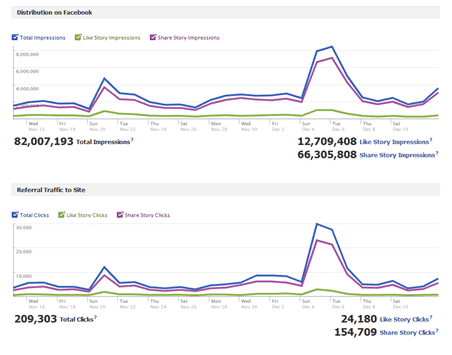 Figure 1: Number of impressions and clicks of your content
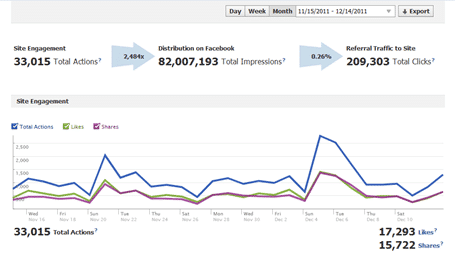 Figure 2: Number of Facebook shares of your content
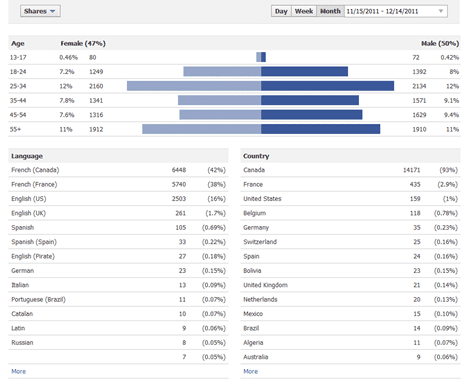 Figure 3: Demographics of users who share
-png-1.png) Figure 4: CTR of Facebook shares
Figure 4: CTR of Facebook shares
With all of this data, you'll be able to make even more informed decisions about optimizing content writing for Facebook.
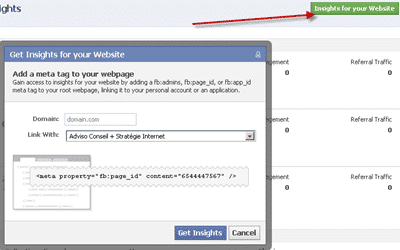
To install it, go to the following address: https://www.facebook.com/insights/ , click on the "Insights for your website" button and copy the code displayed on the screen into the source code of your site.
So. If you have any questions about using the tool or how to analyze the statistics, feel free to ask your questions in comments . Take note that the tool is sometimes slow to start, no need to panic if you do not see any numbers appear!


List of applications to create Facebook contests
We have already told you how to follow Facebook's rules in creating Facebook contests . Now, we are going to give you the tools to create contests in the rules. Facebook contests are often important components of social media strategies. However, it often happens that we do not know how to use it in order to obtain the best value for money when creating Facebook contests.
New Facebook Pages: Understanding the Timeline for Your Brand
On March 30, your company's Facebook page will change forever . The timeline format will be mandatory for all business pages. However, this format has been implemented for users for a few months now. It shocked millions of Facebook users when it launched, and now it's brands' turn to embrace Facebook's changes and adapt to their new realities. Here are the important points to be ready for change!

What value do your Facebook posts have for your conversions?
This article is a collaboration of Yannick Proulx and Loic Karinda. This is part two of our Facebook Analytics series . Check out the first part: Facebook Analytics and its omnichannel solution: Where to start? BEYOND BASIC REPORTS If you manage at least one Facebook page (for which you have administrator access) and one Facebook pixel installed on your site, you should have access to basic reports in your Facebook Analytics account. Be sure to take some time to review these reports and play around with a few segments. Now, the killer question: do interactions like "likes", shares or comments on your Facebook posts have an impact on your conversions (or on other elements such as event pixels? )? We'll use a conversion funnel to find out. Exciting, isn't it? GATHER YOUR DATA, THEN EXPERIMENT! To get started, you'll first need to create an event source group , since your Facebook page and pixel data will be in two different analytics entities. The event source group is Facebook's way of …