
This article has been co-written by Yannick Proulx and Loic Karinda.
This is part two of our Facebook Analytics series. Read the first part: Getting started with Facebook Analytics & its omni-channel solution
Beyond basic reports
Once you have a Facebook Page (of which you are an admin) and a Facebook Pixel installed, you should see some basic reports in your Facebook Analytics account. Make sure you take some time to look at these reports and play with a couple of segments.
Now, what we want to do is to build a funnel that will show us whether interactions like Likes, Shares or Comments from a Facebook Page Post can have an impact on website conversions or other key website activities (tracked with Pixel Events). Exciting right?
Gather your data and build a funnel
To achieve this, you’ll first need to create an event source group because the data from your Facebook Page and Pixel will be in two different analytics entities. An event source group is how Facebook unifies the analytics for your Facebook Page and your website (where activity is tracked with the Facebook Pixel) Simply put, this unlocks a two-channel analysis, which of course comes with a cross-device analysis. Magnifique!
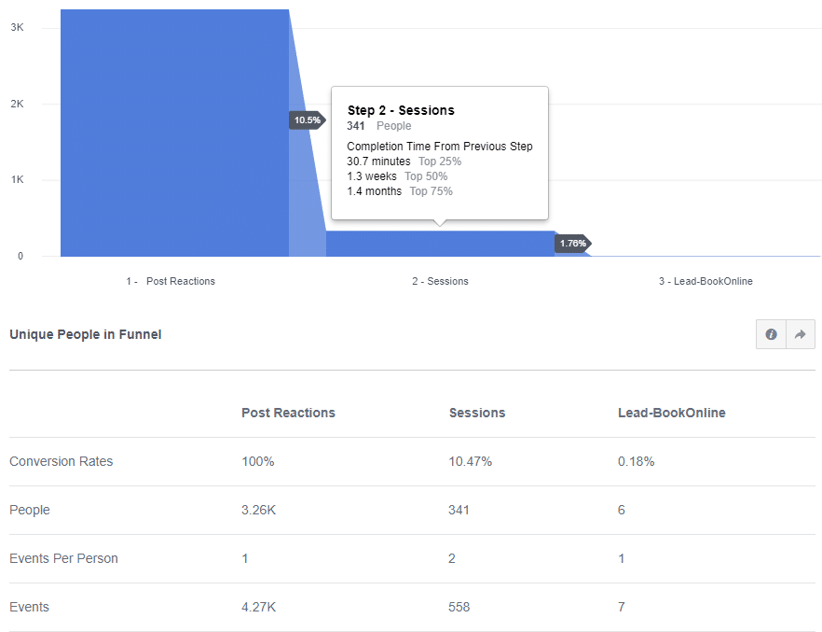
Let’s get going with our funnel. To build a funnel, go to the Activity section and then click on “Funnel.” Our example below shows the Facebook Page and website of a client in the medical field.
Let's break it down
- The first step of the funnel shows the number of Post Reactions from the Facebook Page.
- The second step shows how many users visited the site after reacting to a Facebook Post.
- The third and last step shows how many users converted.
The selected period is Last 30 days. Note that the funnel sequence is not set to “immediately after;” you can see below that ‘Completion Time From Previous Step’ is displayed. In the second step below, you can see that 75% of people who reacted to a Facebook Post and then visited the site, took 1.4 months to do so. Of course you can go further with this funnel by segmenting specific Facebook Posts, devices, cities, ages, gender, and so on and so forth.
If you have always wondered whether your Facebook Posts have a positive impact on your real KPIs, you now know that building a funnel can answer these questions.
Did you like this second part of the Facebook Analytics series? If yes, stay tuned for the part 3 about which channels and devices your users interact with!
Have a question or feedback on this article? Let us know!
