
Opening my email inbox this morning, I find the following message from the Google Analytics team:
As an Administrative user on an account that is currently using custom visitor segments in Google Analytics, we would like to inform you of some changes to the _setVar method and its impact on bounce rate and time on page metrics. Starting Wednesday, January 27, 2009 a call to the _setVar method will no longer be counted as an interaction hit with the result that you may see higher bounce rates and more accurate time on page metrics in your reports.
“Interaction hit”, higher bounce rate and better accuracy of time on page? What is this gibberish? This is the perfect opportunity to demystify Google Analytics' least well-defined metric.
WHAT IS A CUSTOM VARIABLE AND HOW DOES IT WORK?
The personalized variables (User Defined Variables) make it possible to define segments of visitors, according to different criteria. It is up to the site owner to establish what conditions should define a segment on their site. In summary, we attach an identifier to a visitor, a segment, following an action that the latter performs on our site:
- After visiting a specific section of the site
- After completing a contact request form
- Once you become a member of the site
- After purchasing an item on the site
To attach a segment to a visitor, we use the _setVar function . For example, to identify customers on a transactional site, all you have to do is call this function on the transaction confirmation page. Here is what this code could look like, to create a customer segment , on the page after login :
IMPORTANT: this code must be placed after the Google Analytics tracking code. With this code in place, a visitor who completes a transaction on the site will now be classified as a customer . Other visitors will be identified by the very generic “(not set)” segment. The segments thus created are accessible via the “Visitors > Custom values” report:
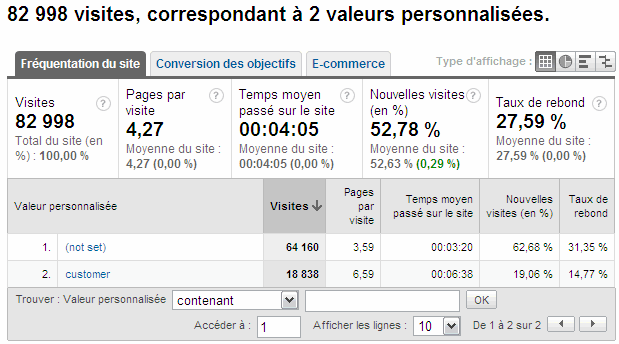
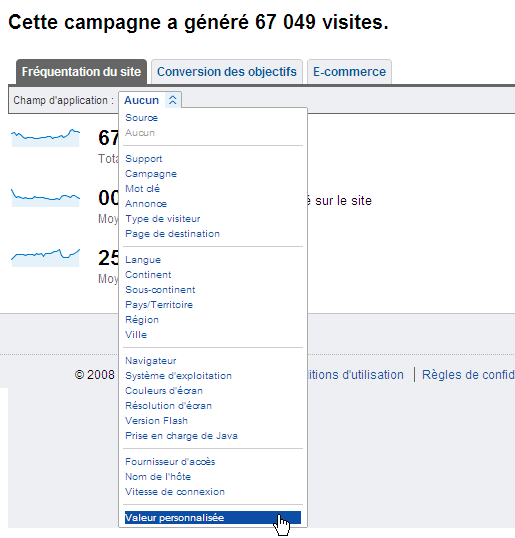
These segments can also be used via the “Fields of application” drop-down menu, under “Custom value”. For example, to view custom segments for a given campaign:
A DOUBLE-EDGED WEAPON
Without considering the limitations and specific behavior of custom variables, the results may appear meaningless and chaotic. By understanding how these variables work, we manage to tame them. The custom variable is not designed to change during a single visit The first segment created during a visit is applied to the entire visit, for metrics calculated per session, i.e.:
- visits
- time spent on site
- rebound rate
- conversion goals
- ecommerce
The classic mistake is to create a “visitor” segment for visitors who land on the site and apply a new “customer” segment after the visitor completes a transaction. Such an approach would result in transactions for the “visitor” segment, since this segment is the first defined, and it is applied to the entire visit.
If the value of the segment changes during the visit, the last segment will be applied to the next visit Let's go back to the example of the “visitor” and “customer” segments. In this context, the "customer" segment will only be applied during the user's next visit. A segment is applied to an entire visit only if no other segment is already defined.
For page views, it's different! Pageviews are not data that is calculated per session. For this reason, the behavior of the session variable differs from what we have just described. Let's take the example of the “visitor” and “customer” segments again. Pages viewed before the definition of the “customer” segment will be assigned to the “visitor” segment. The other page views will be attached to the “customer” segment. What to sow confusion!
AND THE BOUNCE RATE? TIME SPENT ON A PAGE?
Bounce rate and time spent on a page are two metrics calculated from what Google Analytics defines as “interaction hits”. These interactions represent the different types of interaction measured by Google Analytics: a page view, an event, a transaction and formerly, the personalized variable. To measure the time spent on a page, Google Analytics records the time that elapses between two "interaction hits" for a given page.
Formerly, the definition of a personalized variable therefore changed this calculation strangely. The same goes for the bounce rate. By definition (at least according to Google Analytics), a bounce is a visit where only one interaction is counted. Again, using custom variables on a site rendered this data completely unusable.
In my opinion, and it seems to be the opinion of most practitioners, this change is good news: a step closer to a more faithful representation of data in Google Analytics. As a result, for sites that use custom variables, expect an increase in bounce rate and a change in average time per page in the coming days .
